
How to Cancel a Plan
Here is how to cancel a paid plan.
- Go to your account page at https://chacha-ai.dev/settings.
- Click “Manage” under “Current plan”.
- On the checkout screen, click “Cancel plan”.
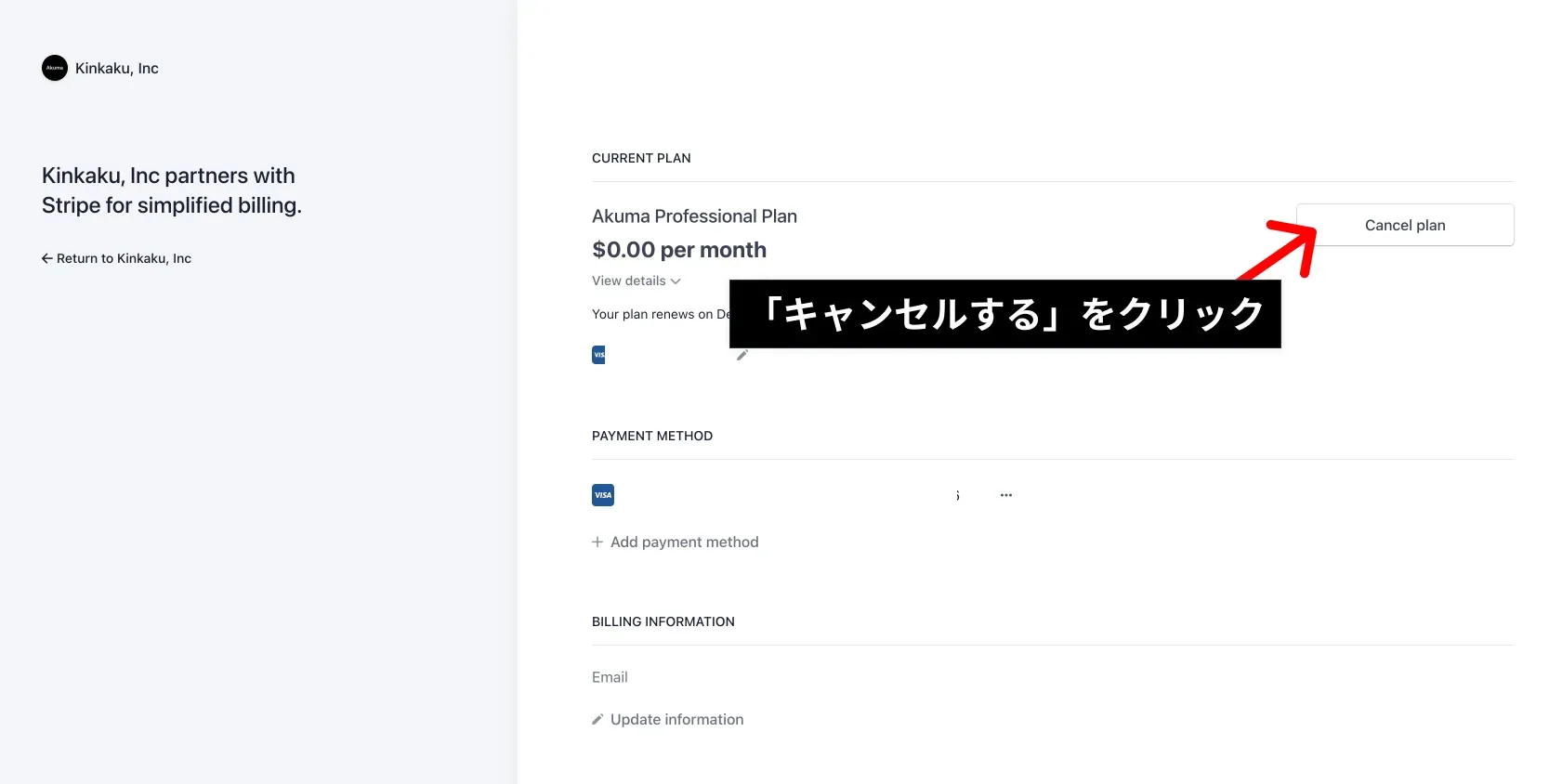
That’s it — the cancellation is complete. No further charges are made from that point.
After cancellation the expiration of already-granted / purchased credits does not change. Credits granted through a subscription expire 60 days after the grant date, and credits purchased as a top-up expire 170 days after the purchase date.
You can cancel your active “Chacha Pass” subscription from the subscription management screen of the store you purchased it from.
iOS
- In-app: Settings → “Manage subscription” → “Proceed to cancel” to open Apple’s subscription management sheet
- Or from iOS: Settings app → your name → Subscriptions → select “Chacha Pass” to cancel
Android
- In-app: Settings → “Manage subscription” → “Proceed to cancel” to open the Google Play subscription management screen
- Or from the Google Play app: menu → “Payments and subscriptions” → “Subscriptions” → select “Chacha Pass” to cancel
After cancellation you can keep using “Chacha Pass” features until the next billing date. The expiration of already-granted credits does not change: subscription-granted credits (Chacha Pass) expire 60 days after the grant date.